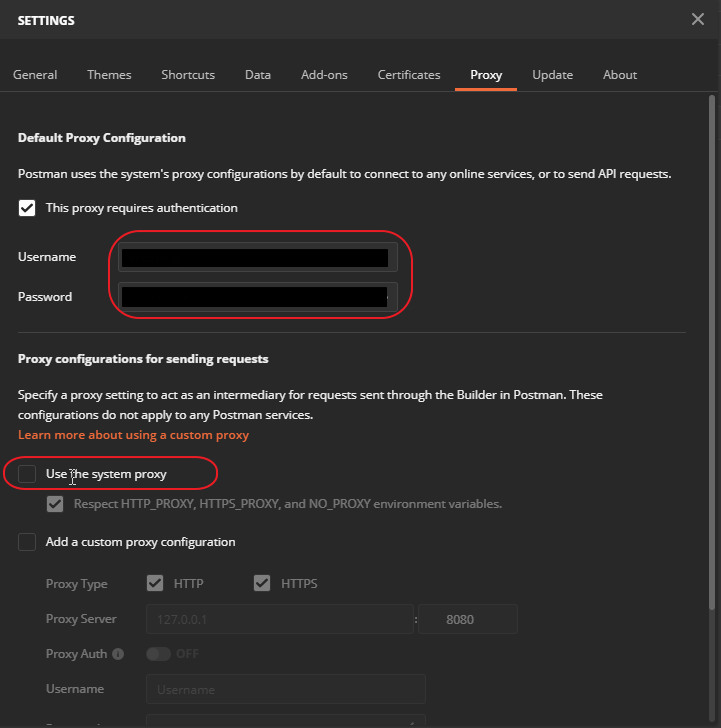
This error occurs for instance if you are on a protected company network. Fix: go to settings -> Proxy ->
check “This proxy requires authentication”
set your AD Windows username and password here.
Uncheck “Use the system proxy”
My bookmarks and blogposts regarding Software Development in .NET, C#, Angular, JavaScript, CSS, Html
This error occurs for instance if you are on a protected company network. Fix: go to settings -> Proxy ->
check “This proxy requires authentication”
set your AD Windows username and password here.
Uncheck “Use the system proxy”
A tool I use frequently, so much faster than windows built-in search function.
Everything
Locate files and folders by name instantly.Small installation file
Clean and simple user interface
Quick file indexing
Quick searching
Minimal resource usage
Share files with others easily
Real-time updating
Source: voidtools
One of my favorite tools used many, many times every day. A real time saver, I can copy several texts/printscreen/file items and then paste them one at a time. I have bound the hotkey ctrl+shift+v to bring up the available clipboard items menu, which is searchable. I have setting popup position set to “At Cursor”.
Ditto is an extension to the standard windows clipboard. It saves each item placed on the clipboard allowing you access to any of those items at a later time. Ditto allows you to save any type of information that can be put on the clipboard, text, images, html, custom formats, …..
Features Easy to use interface Search and paste previous copy entries Keep multiple computer’s clipboards in sync Data is encrypted when sent over the network Accessed from tray icon or global hot key Select entry by double click, enter key or drag drop Paste into any window that excepts standard copy/paste entries Display thumbnail of copied images in list Full Unicode support(display foreign characters) UTF-8 support for language files(create language files in any language) Uses sqlite database (www.sqlite.org)
Source: Ditto clipboard manager
PicPick – This is currently my preferred screen capture widget.
A full-featured screen capture tool, Intuitive image editor, color picker, color palette, pixel-ruler, protractor, crosshair, whiteboard and more.
Application logs are the most useful data available for detecting and solving a wide range of production issues and outages. Seq makes it easier to pinpoint the events and patterns in application behavior that show your system is working correctly — or why it isn’t.
Seq is built for modern structured logging with message templates. Rather than waste time and effort trying to extract data from plain-text logs with fragile log parsing, the properties associated with each log event are captured and sent to Seq in a clean JSON format. Message templates are supported natively by ASP.NET Core, Serilog, NLog, and many other libraries, so your application can use the best available diagnostic logging for your platform.
Seq accepts logs via HTTP, GELF, custom inputs, and the
seqclicommand-line client, with plug-ins or integrations available for .NET Core, Java, Node.js, Python, Ruby, Go, Docker, message queues, and many other technologies.Free for development and single-user deployment
The free single-user license included with Seq lets developers run Seq locally, and now supports individual developers in production.
Source: Seq — centralized structured logs for .NET, Java, Node.js
With this plugin all files and links in the console will be highlighted and can be clicked. Source code files will be opened in the IDE, other links with the default viewer/browser for this type.
Source: Awesome Console – plugin for IntelliJ IDEs | JetBrains
Great icon library with lots of categories, searchable tags and good pricing.
Source: Streamline 3.0
Draw.io – Free software for creating technical diagrams similar to Visio.
My global .gitignore for those working with Angular/React/Js/.NET based projects with IDES from JetBrains, Vs Code and Visual Studio
https://gist.github.com/AndreasPlahn/f2715c8850850e623b086530da2d62dc
I needed to test a locally developed website in old legacy browser Microsoft Edge version 18. My system is Windows 10 using Oracle VM VirtualBox software.
Here is how to setup the Virtual Machine for accessing an Angular website on the “localhost” hostname. The website also makes requests to a localhost Java based REST API. E.g. upon entering http://localhost:4200 in the VM it should work the same as in the host OS.
VirtualBox software: Oracle VM VirtualBox software
Edge Image: https://developer.microsoft.com/en-us/microsoft-edge/tools/vms/
Use the “Virtualbox” VM image.
Direct link:
https://az792536.vo.msecnd.net/vms/VMBuild_20190311/VirtualBox/MSEdge/MSEdge.Win10.VirtualBox.zip
The VM password is: Passw0rd!
Setup network:
In Oracle VM VirtualBox -> Settings -> network -> Attached to: “NAT”
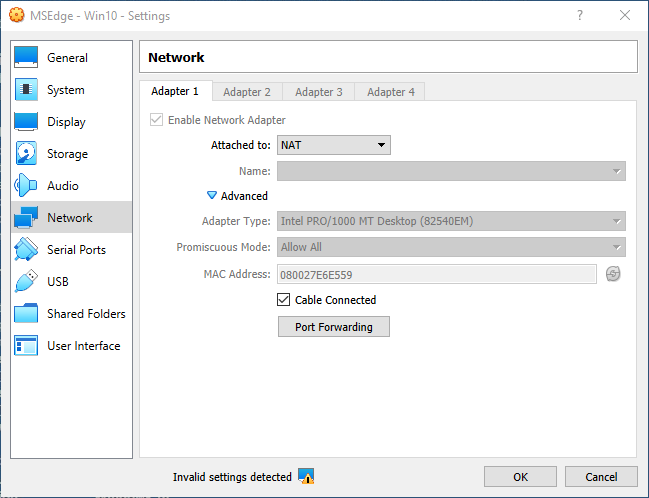
Advanced -> port forwarding:
Name:”Angular server”, Protocol: TCP, Host port: 4200, Guest port: 4200
(dont set host and guest IP)
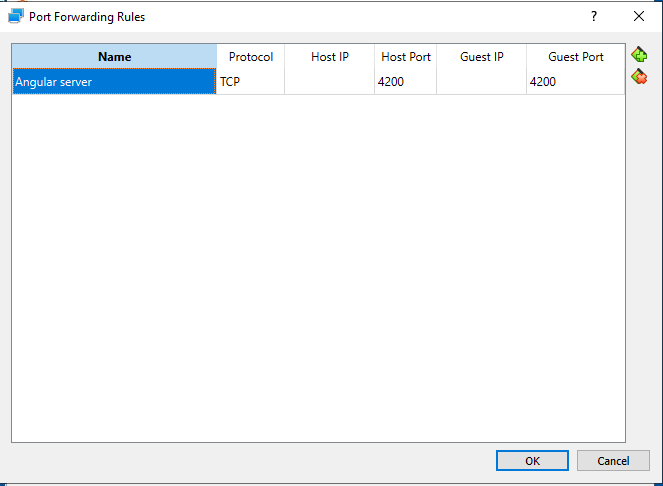
The above makes the Angular web development server (ng serve) available on http://localhost:4200 in the VM.
(In the VM environment)
Add to the c:\windows\system32\drivers\etc\hosts file:
10.0.2.2 outer
The above config tells the VM OS to expose all requests of 10.0.2.2 to the “outer” hosting machine.
(In the VM environment)
Start an elevated cmd and enter this:
netsh interface portproxy add v4tov4 listenaddress=127.0.0.1 listenport=8081 connectaddress=10.0.2.2 connectport=8081
The above command will forward all requests for localhost:8081 to 10.0.2.2:8081 (which the hosts file made available for the “outer” host OS).